Osculating circles
 . .
. . 
. .
To 'osculate' is to kiss!
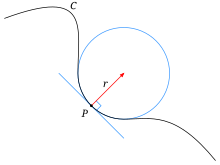
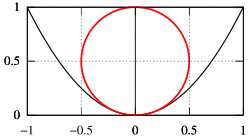
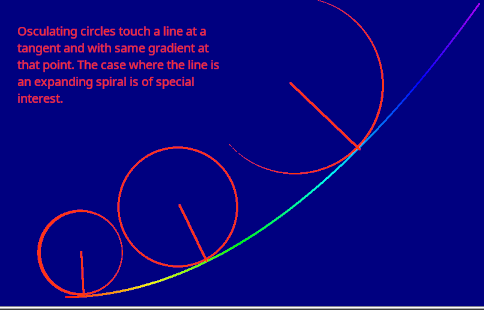
An osculating circle touches another curve at one point, and has the same radius of curvature at that point. The curvature of a circular curve is equal to the reciprocal of the radius. The most natural notation is therefore perhaps in terms of x, y, y' and y''.
If the line were straight, such a circle would have infinite radius and be indistinguishable from the line. The more rapidly the gradient is changing, the smaller an osculating circle would become.
 . .
. . 
This came to my attention via Rosetta Code and Wikipedia. Look also at Witch of Agnesi. It was also relevant to the Cornu spiral and transition curve stuff I was playing with.
To look into this, and a rather interesting special case, I realised that we can get the circle centre and radius by looking at points a small difference ahead and behind the proposed site of an osculating circle by developing code for a circle through three points. I found many solution methods online, often using complex numbers, matrices or determinants, but plumped for a function that accepts three points as x,y pairs, in a space-separated string variable, ie "1.234 0.667" represents the point ( 1,234, 0.667). It returns a string holding x,y and R of the required circle in a similar string.
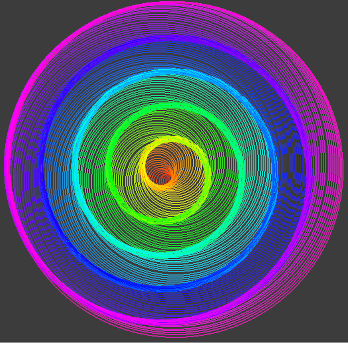
Osculating circles that touch an Archimedean spiral are one interesting case. The 'Witch of Agnesi' is another interesting one. Between these and different colouring schemes I've had a lot of fun over the holiday period.
    nomainwin

    WindowWidth  =800
    WindowHeight =800

    pi      =4 *atn( 1)

    radius  =36

    global col$, rd, gn, bu

    graphicbox #w.g1, 1, 1, 800, 800

    open "Kiss me quick" for graphics_nsb as #w

    #w    "trapclose quit"
    #w.g1 "down ; fill darkblue ; color cyan ; size 1"

    n =0

    for th =0 -0.02 to 3.8 *pi step 0.0025
        x           =radius *cos( th)
        y           =radius *sin( th)
        pres$       =str$( x) +" " +str$( y)
        #w.g1 "size 4 ; color white ; set "; 400 +10 *x; " "; 360 -10 *y

        if ( th >0) and ( ( n mod 20) =0) then 'and abs( th /pi /4 -int( th /pi /4)) <0.004 then
            result$ =circleThru$( lastButOne$, last$, pres$)
            xC      =int( 400 +10 *val( word$( result$, 1, " ")))
            yC      =int( 360 -10 *val( word$( result$, 2, " ")))
            rC      =int(      10 *val( word$( result$, 3, " ")))
            call hsv2rgb 360 *th /6, 0.49, 0.99
            #w.g1 "color "; col$
            #w.g1 "size 1 ; place ";           xC; " "; yC
            #w.g1 "size 1 ; circle "; rC
        end if

        lastButOne$ =last$
        last$       =pres$

        radius      =radius -0.007
        if radius <=0 then exit for
        n =n +1
    next th

    call saveScreen

    wait

    sub quit h$
        close #h$
        end
    end sub

    function circleThru$( a$, b$, c$)    '   circle through x1,y1  x2,y2  x3,y3
        x1  =val( word$( a$, 1, " ")):   y1  =val( word$( a$, 2, " "))
        x2  =val( word$( b$, 1, " ")):   y2  =val( word$( b$, 2, " "))
        x3  =val( word$( c$, 1, " ")):   y3  =val( word$( c$, 2, " "))

        A   =x1 *( y2 -y3) -y1 *(x2 -x3) +x2 *y3 -x3 *y2
        B   =( x1^2 +y1^2) *( y3 -y2) +( x2^2 +y2^2) *(y1 -y3) +( x3^2 +y3^2) *( y2 -y1)
        C   =( x1^2 +y1^2) *( x2 -x3) +( x2^2 +y2^2) *(x3 -x1) +( x3^2 +y3^2) *( x1 -x2)
        D   =( x1^2 +y1^2) *( x3 *y2 -x2 *y3) +( x2^2 +y2^2) *( x1 *y3 -x3 *y1) +( x3^2 +y3^2) *( x2 *y1 -x1 *y2)

        xC  =0 -B /2 /A
        yC  =0 -C /2 /A

        R   =( ( B^2 +C^2 -4 *A *D) /( 4 *A^2))^0.5
        circleThru$ =str$( xC) + " " +str$( yC) +" " +str$( R)
    end function

    sub saveScreen
        #w.g1 "flush"
        #w.g1 "getbmp scr 0 0 800 800"
        bmpsave "scr", "bmp/scrJH" +str$( time$( "seconds")) +".bmp"
        #w.g1 "cls ; drawbmp scr 0 0"
    end sub

    sub hsv2rgb h, s, v '                       hue 0-360, saturation 0-1, value 0-1
        c   =v *s       '                           chroma
        h   =h mod 360
        x   =c *( 1 -abs( ( ( h /60) mod 2) -1))
        m   =v -c   '                               matching adjustment

        select case
            case h < 60
                r = c: g = x: b = 0
            case h <120
                r = x: g = c: b = 0
            case h <180
                r = 0: g = c: b = x
            case h <240
                r = 0: g = x: b = c
            case h <300
                r = x: g = 0: b = c
            case else
                r = c: g = 0: b = x
        end select

        rd      = abs( int( 256 *( r + m)))
        gn      = abs( int( 256 *( g + m)))
        bu      = abs( int( 256 *( b + m)))
        col$    =right$( "  " +str$( rd), 3) +" " +right$( "   " +str$( gn), 3) +" " +right$( "   " +str$( bu), 3)

    end sub